Wednesday, 9 November 2011

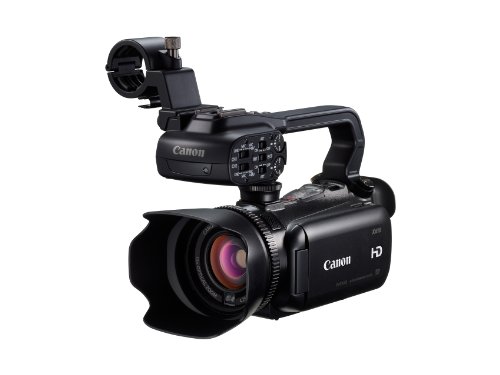
Canon XA10 Professional Camcorder with 64GB Internal Flash Memory and Full Manual Control


Canon XA10 Professional Camcorder with 64GB Internal Flash Memory and Full Manual Control


Rate This Product :


Canon XA10 Professional Camcorder with 64GB Internal Flash Memory and Full Manual Control

Canon XA10 Professional Camcorder with 64GB Internal Flash Memory and Full Manual Control
The XA10 Professional Camcorder allows users to record up to 24 hours of clear high definition video to a 64GB internal flash drive or to two SDXC-compatible memory slots. With Relay Recording, the camcorder automatically switches video recording from the internal drive to the SD memory cards when the memory becomes full.

Canon XA10 Professional Camcorder with 64GB Internal Flash Memory and Full Manual Control

  • 64GB internal flash drive and 2 SDXC-compatible memory card slots
  • Genuine Canon 10x HD video lens with 8-blade Iris and manual focus ring
  • Canon native 1920 x 1080 CMOS image sensor
  • Canon DIGIC DV III image processor
  • Dynamic SuperRange OIS with powered IS

Canon XA10 Professional Camcorder with 64GB Internal Flash Memory and Full Manual Control

Available at Amazon : Check Price Now!


Canon XA10 Professional Camcorder with 64GB Internal Flash Memory and Full Manual Control
*** Product Information and Prices Stored: Nov 10, 2011 00:12:55 ***

sylvania sdvd9000 portable dvd player

Tuesday, 8 November 2011

Motorola XOOM accouterments and accent review

Motorola XOOM accouterments and accent review Video Clips.


MobileBurn.com - Motorola and Verizon hooked us up with a brand new Motorola XOOM Android 3.0 Honeycomb tablet as well as an assortment of accessories, including an HDMI dock and a Bluetooth keyboard. In this video we take a look at the XOOM hardware and those accessories, showing how the keyboard works with the tablet. More info: www.mobileburn.com

Tags: id13177, tablet, motorola, xoom, verizon wireless, android, 3 0, honeycomb, tegra 2, dual core, video chat, 720p, hd, video, video review, bluetooth, keyboard, hdmi, dock, speaker

viking grill grates nordic ware microwave pressure cooker xloop sunglasses

Monday, 7 November 2011

HDMI Versus DVI

HDMI Versus DVI

Hdmi

In order to make you understand what is better, HDMI or DVI, let's see first what they actually consist of. DVI comes from Digital Visual Interface and names the video connectivity standard that links your PC monitor or projector to the computer unit and, in addition, to High-Definition TVs, EDTVs and Plasma displays. It is used even by some DVD player models for providing high-quality imaging. DVI was the most advanced video transfer method before HDMI started to be available on the market, and features partial support for HDMI.

There are different DVI connections you've probably encountered in the specification lists of your home systems, starting with the DVI-Digital for linking video cards with LCD monitors for a high-quality image compared to analog. The DVI-Analog cables are used with analog displays like CRTs for connecting to VGA devices, while the DVI-Integrated brings both digital and analog support. The latter is the best, eliminating the need for VGA-to-DVI-D and DVI-D -to-VGA convertors.

I was telling you about the support for HDMI. Well, DVI-D and DVI-I come with Single-Link and Dual-Link connectors to send the Transition Minimized Differential Signaling data format, used also by HDMI. With dual link, the connection not only doubles the transmission power but also increases the signal quality, so if a DVI single link 60Hz LCD display renders 1920 x 1200 imaging, a DVI dual link reaches 2560 x 1600 resolution. Everything's fine, people used DVI for a long time and are all satisfied with it, but the problem is that the DVI connectivity doesn't support audio, just video transmission, and here comes the HDMI technology created to send high-quality 8-channel audio and high-definition video over a single cable.

What is HDMI actually? -The High-Definition Multimedia Interface transmits uncompressed digital signals and is the best solution available today to connect all high-end systems including Blu-ray players, computers and gaming consoles to PC monitors and High-Definition television panels, for a perfect image quality. Since 2002 when it was introduced, the HDMI standard has been improving after a few revisions, which lead at the HDMI 1.3b1 available today with sRGB color space standard, YCbCr RGB encoding, 8 channel LPCM/192 kHz/24-bit audio capability, Blu-ray Disc video and audio at full resolution, Consumer Electronic Control, DVD-Audio support, Super Audio CD support, Deep Color with very wide color gamut, xvYCC, Auto lip-sync, Dolby TrueHD bitstream capable, and DTS-HD Master Audio bitstream capable.

Depending on the materials used to build it, the 19-pin HDMI cable, which is much smaller than a DVI cable, can extend over 100 meters using fiber optic technology and extenders, or up to 15 meters when no booster or repeater is used, similar with DVI. There are 2 cable categories available. Category 1 is recommended for monitors and TV panels with this feature enabled, for 16:9 aspect ratio and 1920 x 1080 resolution of 2.07 million pixels. The HDMI Category 2 cable enables resolutions of up to 2560 x 1600 pixels at 16:10 aspect ratio on very large displays.

If you need to connect a DVI source to a TV display featuring HDMI connectivity you can do it easily after acquiring a DVI-to-HDMI cable with a DVI connector on one end and a HDMI connector on the other end. The price is acceptable, ranging between and 0 depending on the length, and this way you can get high-quality images but with no audio, so you'd still need to add an audio connector.

solar lighted patio umbrella
Saturday, 5 November 2011

Tips to Troubleshoot HDMI Cables

Tips to Troubleshoot HDMI Cables

Hdmi

HDMI cables are becoming one of the most used cables in the market today. If you go to your local electronic store, you will be able find various gadgets, which use these cables for providing high definition audio and video experience. Once you start using the HDMI connector, you will be able to enjoy the amazing features it provides you. One of the best features of the HDMI cables is, you will be able to connect these cables to your TV and watch media directly from your computer. Therefore, if you want to watch your music or flicks, you do not have to burn bunch of CDs or DVDs. These cables can also provide you the best clarity video.

There are many people, who are still not aware of the amazing features of the HDMI connectors. If you are one amongst them, this content will provide you some information. Most of the people who do not have proper knowledge about the HDMI cables will experience in connecting and getting it to the display properly. If you do not connect the cable properly, you might experience, flickering, improper aspect ratio or scrolling picture. Therefore, it is quite imperative to know more about the cables to get rid of these hassles.

If you are not able to connect the HDMI connector by yourself or experience any problems, which you may not able to troubleshoot by yourself, taking the assistance of an expert will be the best option for you. There are numerous service providers in the market, who will be able to solve your problems within no time. Internet is also the best source to know more about these cables. There are numerous websites in the net, which will help you to troubleshoot your HDMI cables.

neutrogena pink grapefruit acne scrub reviews

SIG TV - Monster High Speed HDMI Cable 750 HD

SIG TV - Monster High Speed HDMI Cable 750 HD Video Clips.


Tags: sig20111029, 0

storage wicker basket bare essentials bras

Thursday, 3 November 2011

Wednesday, 2 November 2011

What Capture Card to buy in 2011 (SD and HD)

What Capture Card to buy in 2011 (SD and HD) Video Clips.


These are just brief things I said: EasyCap DC60+: Has an LED light to tell you when its connected. Very cheap however its standard definition so if you have a HD TV you might want invest into something that records in HD. But its not to bad quality as long as you have the right render settings and you can still use it with a HD TV but you need to change your xbox to SD I did use this and I kept having problems so you might want to try a. Dazzle DVC 100 from Pinnacle: Its another Standard definition capture but it is by far the most popular. It also has and LED light to tell you when its connected . It comes with a software called Pinnacle instant DVD recorder which is an easy program to use but for professional editing or rendering you should definitely get Sony Vegas pro 8, 9 or 10. Which is great for any editing or rendering.. Im not going to tell you how to get that program for free so don't ask. Next we have THE Hauppauge HD PVR which is the capture card I use now. It is fantastic, reliable and records in 480p 720p or 1080i. this is the most used one in the HD range. Requirements are: Dual core CPU processor minimum. Microsoft® Windows® 7 (32/64bit), Vista (32/64bit) or Windows XP Service Pack 3. Graphics with 256MB memory (or greater) And a Sound card This product also works for Mac. Oh and this comes with a program called Total Media extreme. Its easy to setup this PVR and comes with all the wires needed. You may need to update your drivers when you get it thought ...

Tags: paintball, guns, technology, chips, semiconductors, world war, widescreen, defence, war games, off-road vehicles, garderning, defense, modren warfare, tourism, self, airsoft, 4x4, quality, drive

Oriental Rugs Alexandria Va